


We have reached the end of another successful year at Zenarmor, with the third and final major release of Zenarmor for 2023 ready for you to download. Like with all the previous major releases this year, Zenarmor 1.16 includes new, fresh capabilities and tools that will ultimately help you create a formidable defense against bad actors and improve your overall network security posture, regardless of where you choose to deploy Zenarmor, on-prem or in the cloud.
In this release, we are proud to introduce a new device identification and management capability, giving you improved visibility and control of the devices using your network, as well as Community ID flow hashing support to easily correlate device logs with connection logs, giving you full end-to-end visibility of the process on the device initiating the connection on your network to its final destination on the internet.
In addition, almost every module of Zenarmor has had an improvement or general bug fix, so let’s take a closer look at what you can expect from this feature-packed edition of Zenarmor 1.16.
Enhanced Visibility and Security with Device Identification and Access Control
The engine is the heart of Zenarmor, and in this release, device identification is now available, where Zenarmor automatically detects the devices attached to your network, providing an overview of their details, such as hardware vendor, operating system, name, hostname, IP and MAC addresses, with the ability to group these devices into their respective categories. The device identification feature provides valuable insights into the IT ecosystem, enhancing your network visibility and overall network security. The following are the principal benefits of utilizing the Zenarmor device identification function:
-
Maintaining an up-to-date device inventory: Zenarmor keeps an up-to-date list of all connected devices, so you don’t have to keep track of them manually, ensuring no devices are missed.
-
Enhanced network visibility: Zenarmor provides detailed information about each device connected to the network, which can be useful to IT teams when investigating their infrastructure, providing an easy means to spot “rogue” or risky devices attached to the network.
-
Real-time device tracking: Zenarmor continuously scans the network for new devices. This real-time tracking ensures that IT teams always know what new devices have been added to their network, once again providing a powerful means to protect the network against rogue or unauthorized devices.
It must be noted that this is the first implementation of the Zenarmor device identification feature, and while it’s highly capable of detecting most devices on your network, there may be some cases where minor inconsistencies or erroneous information is observed, which may require manual user correction and input. This is because, without full TLS inspection, only partial device information is obtained when inspecting the network traffic. The good news is that as of Zenarmor 1.17, expected to ship in the first quarter of 2024, full TLS inspection will be available, which will improve device identification as well as enhance the overall network inspection capabilities of Zenarmor as a whole.
Taking device identification functionality further, device access control has been integrated where detected devices can be categorized as trusted or untrusted, and through your Zenarmor policies, you can choose to restrict untrusted devices from accessing the network. This essentially empowers IT teams with more granular control over the devices attached to the network, enhancing overall network security and preventing potential data breaches by blocking unauthorized device access In addition to this, this feature also simplifies IT asset management (ITAM) by enabling IT teams to centrally control devices through a single pane of glass. To drill down into this feature’s use cases a bit further, IT teams can:
- Set Access Rules: That inform devices what resources they can reach and how they can connect to the network.
- Prevent Unauthorized Access: Zenarmor can prevent devices that aren’t trusted from connecting to the network. This stops users from gaining access without permission and plays a part in your zero-trust strategy, ultimately lowering your risk.
- Enforce Device Compliance: IT teams can ensure that all devices meet certain security standards before they can connect to the network by enforcing device compliance rules.
Figure 1: New Zenarmor device identification and management dashboard
Community ID Support for Advanced Threat Hunting
Another great addition to this release is Community ID flow hashing support. Community ID, in a nutshell, creates a unique hash identifier for each connection made through the network, derived from the network connection’s source/destination port, source/destination IP address, seed, and transport protocol (TCP/UDP). This unique hash identifier can then be used while correlating log data between your systems to give more context to the flow of traffic. This gives you full end-to-end visibility of the process on the device initiating the connection to its final destination on the internet. If you are interested in learning more about this, please have a look at the previous article we published, where we demonstrated a basic threat-hunting exercise using the Community ID Network Flow Hashing capabilities built into Zenarmor and ELK (Elasticsearch, Logstash, and Kibana) to correlate the log data between Zenarmor and a Windows 11 device using Sysmon.
Figure 2: Reporting and Data Settings menu to toggle Community ID support in Zenarmor
Figure 3: An example of how Community ID can be used to correlate log data between Zenarmor and a Windows 11 client using a Kibana dashboard
Additional advanced security features including DNS Tunneling Attack Detection, Botnet DGA protection, and Internal CA Support
At Zenarmor, we strive to improve our feature set based on industry standards and client feedback, and we are dedicated to providing you with the best network security possible. With this update, you can now enjoy additional enhanced security controls that provide advanced threat-prevention capabilities, including:
-
Improved threat detection and data exfiltration prevention capabilities by identifying tunnels over the DNS protocol.
-
Internal CA certificates are now supported, enhancing security in packet inspection.
-
Enhanced security with Botnet DGA (domain generation algorithm) detection and prevention making it harder for botnets and malware to use these advanced attack techniques to evade detection.
We encourage you to try these exciting new additions today to truly experience their benefits.
Figure 4: Enabling Botnet DGA and DNS Tunneling Protection in the Advanced Security Configurations.
Reporting improvements and new functionality
Zenarmor comes standard with 60+ reports, giving you a complete overview of your network. In light of the addition of device identification and management features, reporting has now become more powerful. In this release:
-
By popular request, a previous feature has returned from the old Zenarmor OPNsense UI, where you can once again access the Live Session Explorer with a single click on the piechart or by selecting the piechart names followed by the ellipsis icon to explore the traffic details.
Figure 5: By clicking the pie charts, you can now access the Live Session Explorer, back by popular request
-
You can conveniently access the device details by clicking on the device column in Live Sessions Explorer or by clicking on the device-related charts, like Top Devices, in Reports.
Figure 6: Viewing device details by selecting the device name in the Live Session Explorer
-
We added the “Show only blocked connections” option to view blocked connections exclusively in Live Session Explorer, aiding in threat analysis.
-
Direct access to “Detected” and “Blocked Threats” reports from the firewall dashboard streamlines traffic analysis and threat hunting.
In addition to this, a few other improvements have been made to the existing reports, giving you a more streamlined user experience.
UX Enhancements and new features
Through Zenarmor’s partnership with OPNsense, you are already offered a well-integrated user experience, and as of Zenarmor 1.14 released earlier this year, the Zenarmor dashboard was completely rewritten and designed to give you an identical look and feel to what you may have experienced using the Zenconsole dashboard.
As of this release, this integration has been enhanced further, where you can now download internal CA certificate files in CRT format via the “Block Notification Page” and “Certificate Authority” settings pages, which is more convenient.
In addition to this, the user experience is improved with a newly implemented and intuitive Zenarmor user interface. The updated fonts and color scheme ensure a seamless and enjoyable experience. Moreover, if you make use of High Availability (HA) in your deployment, this has been improved, offering better synchronization on the OPNsense UI with additional configuration options.
Other minor improvements include general UI enhancements and bug fixes.
Filtering, Application Control, and Threat Intelligence enhancements
Zenarmor’s web and application filtering, driven by the creation of policies, has just gotten better. Filtering management capabilities have been enhanced, with the option to allow or block based on Security categories via Live Sessions Explorer through Zenconsole.
In addition to this, to support the new device identification and management features, the “Device” and “Device Category” options are now available in the policy configuration settings, allowing you to filter by device type or category. This functionality can be powerful when you have to treat certain device types differently. e.g., IoT devices may need a more restrictive policy, so you can now easily target those devices independently with a unique policy. For more thoughts on this, feel free to check out the article, IoT Data Security in a Connected World: The Necessity of SASE in IoT Data Protection.
Other improvements in this release include better identification of WireGuard applications through improved fingerprinting of these applications.
Figure 7: The addition of device management controls, where you can create policies around devices or device categories
Zenconsole and Agent improvements and additions
If you prefer using Zenconsole to manage your Zenarmor deployments, you will be pleased to know that this has also been improved in this release. You can now add more charts to your scheduled reports, and as previously mentioned, you can now download internal CA certificate files in CRT format via the “Block Notification Page” and “Certificate Authority” settings pages.
Various other UI and functional improvements, as well as bug fixes, make Zenconsole more streamlined and powerful than ever. For more information about these minor improvements, please check out the release notes.
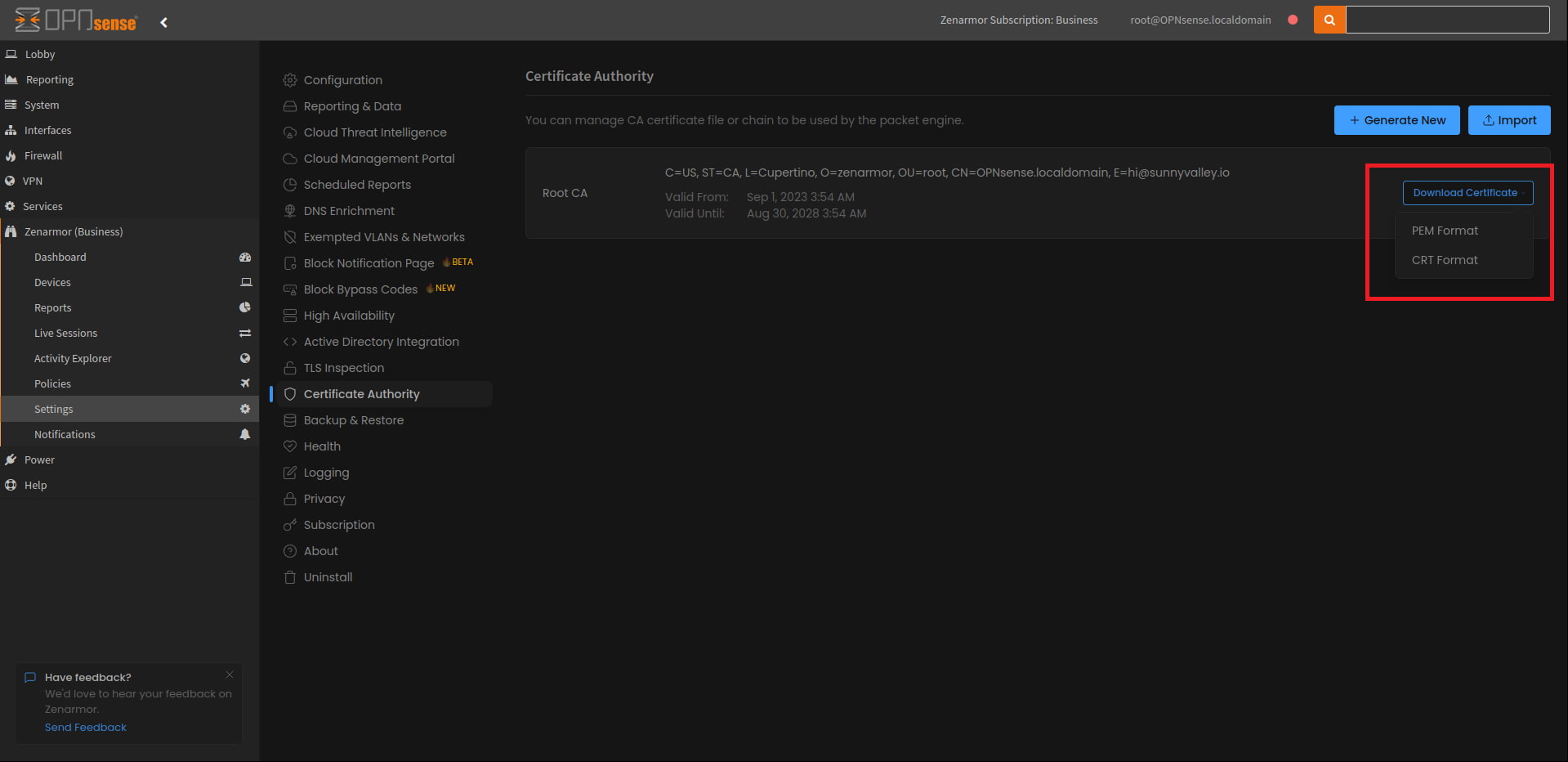
Figure 8: Dashboard view showing the ability to download CA certificates in the CRT format. This is now available in both the OPNsense and Zenconsole dashboards
Improved platform support
Zenarmor is versatile and can be installed on multiple Linux or Unix-based platforms other than OPNsense, including Ubuntu, FreeBSD, Amazon Linux, pfSense CE, and CentOS. This is necessary to support the deployment of Zenarmor as a Secure Web Gateway (SWG) part of a SASE architecture or if you are unable to run OPNsense in your environment.
As of this release, Zenarmor now fully supports Ubuntu 23.04 Lunar Lobster. In addition to this, Dynamic Kernal Module Support (DKMS) has been shipped, allowing for Netmap module improvements and a simplified installation process. If you are interested in learning more about Netmap and the important role it plays in making Zenarmor packet filtering possible, please check out this article that discusses Zenarmor’s mission towards a device-agnostic Netmap in the FreeBSD kernel and emulated Netmap support.
Some closing thoughts…
So as you can tell, we have had another productive year at Zenarmor, finishing up the year with a bang and announcing the release of Zenarmor 1.16, with even more exciting new developments planned for 2024.
We would just like to take this opportunity to thank everyone who is part of the Zenarmor community for their support, and we would like to wish everyone who is taking time off a safe and happy holiday.
If you are new to our community and would like to explore Zenarmor, we highly encourage you to try it on a free 15-day business edition trial that includes all this great functionality.
Alternatively, feel free to contact Zenamor at  and ask for assistance getting your free trial set up and started today. We’d love to hear from you!